Cribsheet
Hold ⌘. See every shortcut
Free · version 0.4.2 · macOS 14 or later
Cribsheet is a tiny background utility for macOS. Press and hold Command for a moment, and a floating overlay shows every keyboard shortcut in whatever app is in front of you — grouped by menu, exactly as that app defines them. Let go, and it's gone.
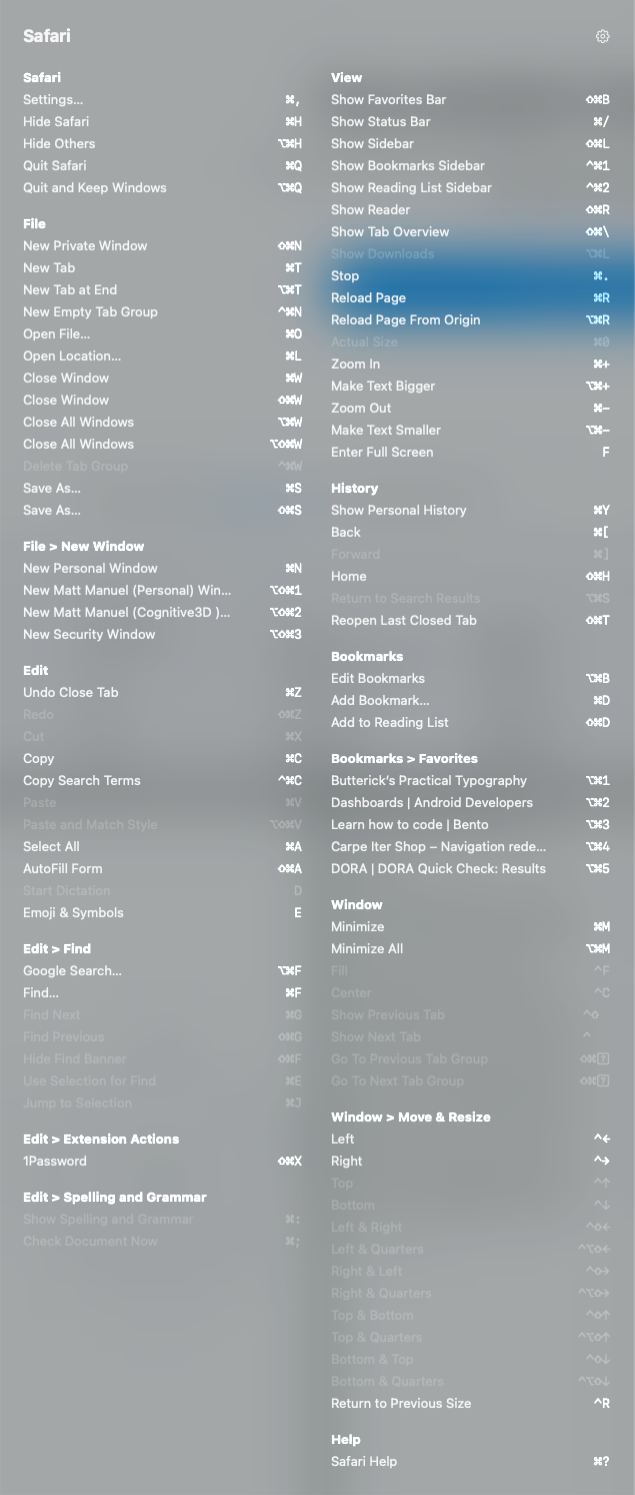 Cribsheet reading Safari's own menu bar. Every app looks like this.
Why it exists
Cribsheet has no shortcut database to fall in and out of date. It reads the frontmost app's menu bar live, the moment you ask, so it's always correct — including any shortcut you've customised yourself. It's a spiritual successor to CheatSheet, a small utility that did the same thing until its developer moved on; Cribsheet exists because I missed it.
Built to see nothing else
Cribsheet reads menu titles and their shortcuts. Nothing more. It makes no network calls unless you turn on the optional Help the developer switch in Settings, which is off by default. There is no update check and nothing else is ever sent. See the privacy policy — it's short.
Requirements
macOS 14 or later. Free. Under 1 MB.
Get it
Cribsheet is free. Builds are signed with Developer ID and notarised by Apple, universal for Apple Silicon and Intel.
Download the latest release, unzip, and drag Cribsheet.app to Applications. Or use Homebrew:
brew install --cask matt-the-ogre/tap/cribsheet
On first launch, grant access in System Settings > Privacy & Security > Accessibility — reading menus through the Accessibility API is the whole mechanism. (It's also why Cribsheet can't be sandboxed, so no Mac App Store for this one.)
Bugs and ideas go to the issue tracker. If Cribsheet is useful to you, you can sponsor me on GitHub.